Android CTF
CompleteInitial Approach & Research
Coming into this challenge with only about 1 or 2 crackmes of experience from when i first got into reversing I had a hard time understanding where to begin.
- At first I was looking through android boilerplate in JADX and I didn’t really know where the real part of the challenge lived.
- I then looked into user input I wanted to see if maybe it had something to do with user input I still couldn’t find anything at first.
- I then stumbled across the correct directory in the APK
com.google/ctf/I found 3 subdirectories that looked to be part of the main appdashboardhomeandnotifications
Analysis
Upon looking through the files in the directories listed above, the only one that stood out to me was the notifications portion as the Home and Dashboard portion looked almost identical in JADX
Notifications: I started off by noticing that the Notifications Fragment file was loading a library called fragment, in the beginning I knew this was probably important but I wanted to start by looking around first.
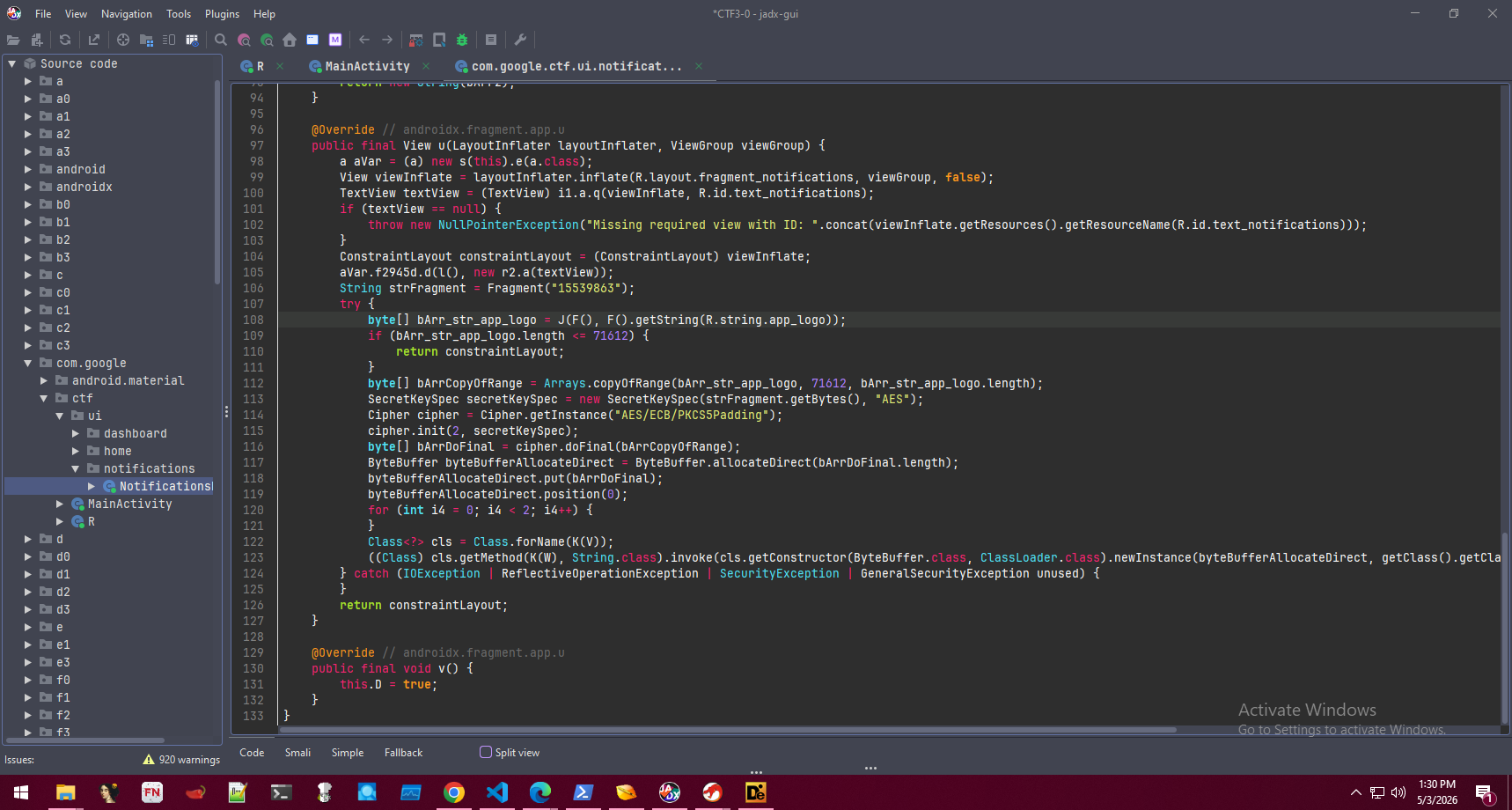
I noticed that there were 4 byte arrays with numbers that looked like they represented ASCII chars no luck with that but… upon scrolling down I found that there was a function that took a byte array as a parameter and xor’d the array by 69
public static String m901K(byte[] bArr) {
    byte[] bArr2 = new byte[bArr.length];
    for (int i4 = 0; i4 < bArr.length; i4++) {
        bArr2[i4] = (byte) (bArr[i4] ^ 69); // XOR key is 69
    }
    return new String(bArr2);
}
def xor_decrypt(byte_array, key=69):
    return "".join(chr(b ^ key) for b in byte_array)

f1501V = [33, 36, 41, 51, 44, 46, 107, 54, 60, 54, 49, 32, 40, 107, 12, 43, 8, 32, 40, 42, 55, 60, 1, 32, 61, 6, 41, 36, 54, 54, 9, 42, 36, 33, 32, 55]
f1502W = [41, 42, 36, 33, 6, 41, 36, 54, 54]
f1503X = [36, 43, 33, 55, 42, 44, 33, 107, 48, 44, 107, 35, 55, 36, 34, 40, 32, 43, 49, 107, 8, 36, 44, 43, 19, 44, 32, 50]
f1504Y = [17, 45, 32, 3, 41, 36, 34]

print(xor_decrypt(f1501V))
print(xor_decrypt(f1502W))
print(xor_decrypt(f1503X))
print(xor_decrypt(f1504Y))
Upon decrypting the byte arrays we’re left with this
dalvik.system.InMemoryDexClassLoader
loadClass
com.google.ctf.Payload
run
Looks like we’re going to be loading the Payload class and running it
I noticed earlier that we were loading that native library called fragment, I also took note here of the fact we were using AES/ECB/PKCS5Padding and what looked to be like some magic numbers that I believed to be the following
- Offset in byte array that was created from the
R.string.app_logo= 71612 - Input to the native Fragment function =
15539863
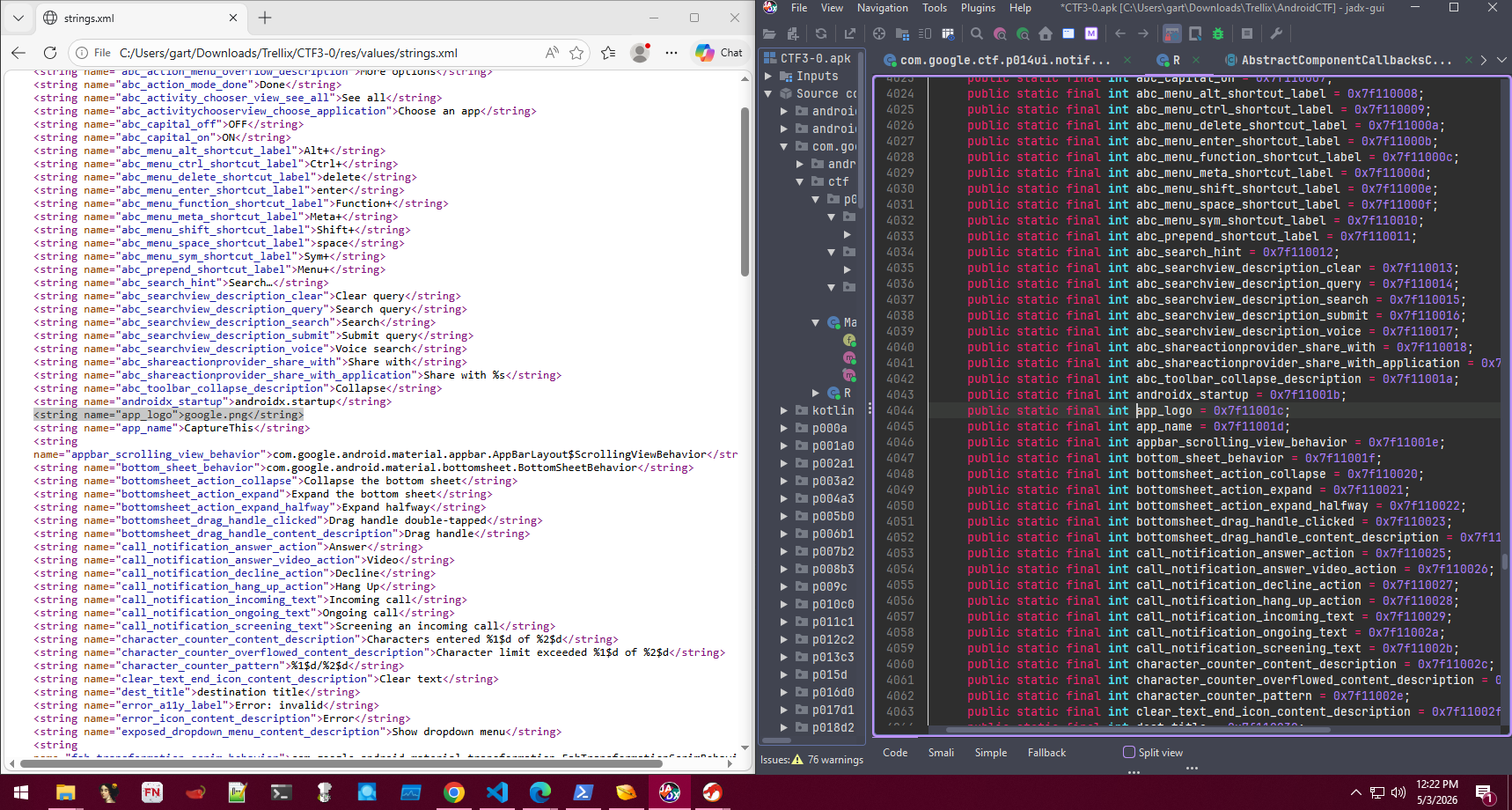
I looked for the string app_logo in JADX and it just gave me a hex value, I did some research and found that it would be in the strings.xml file upon finding it we find the file listed google.png. I kept note of the google.png that was located in the assets directory.
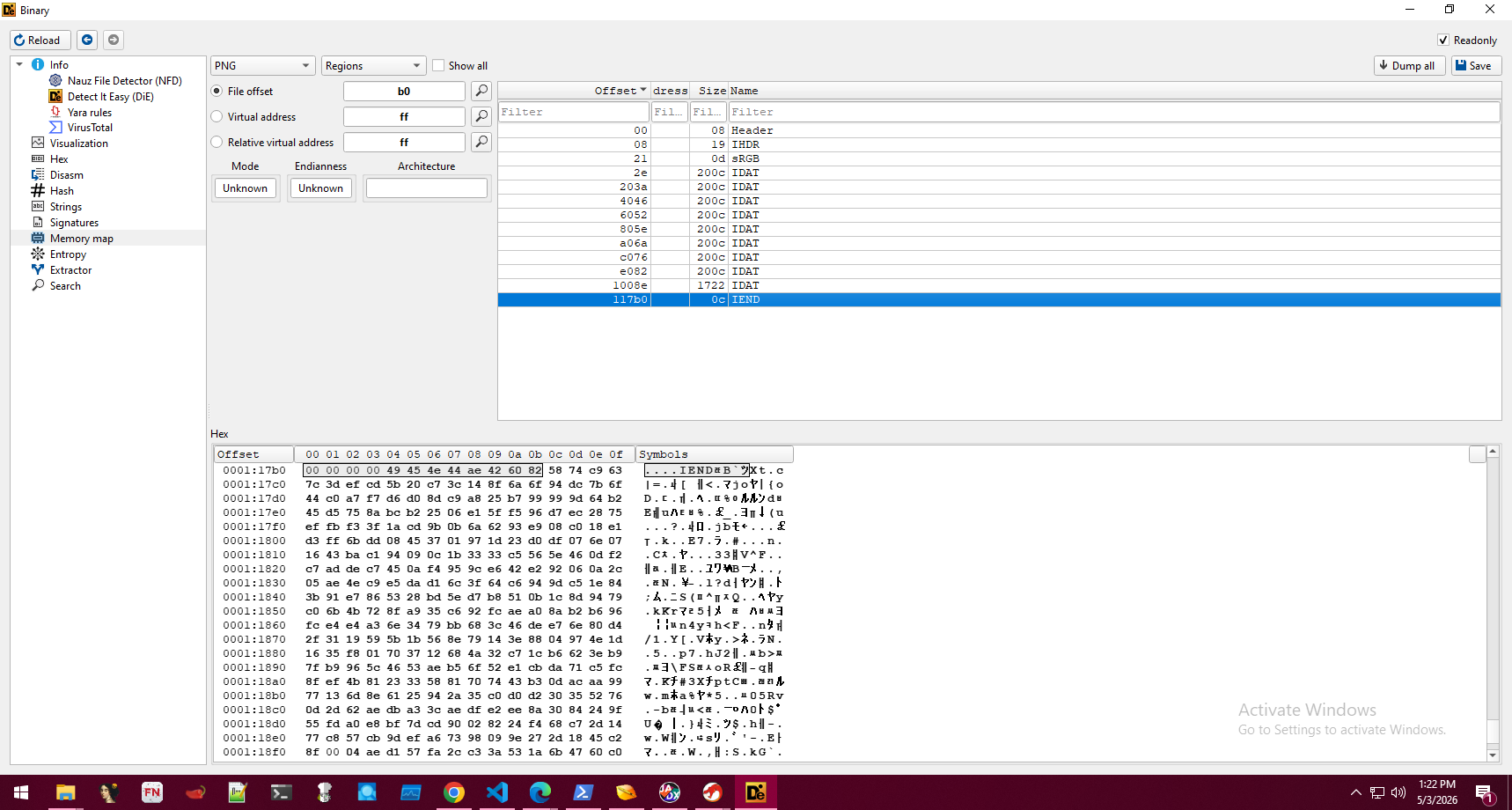
The reason that I found this file to be the culprit although there were other google.pngs is because upon looking at the section headers IEND ends at 117bo meaning there is more than likely our encrypted blob past that offset and that would match up with our binary value of 71612 to hex which is 117BC
Based off of this information I knew I needed to analyze what was going on in the native library for my next steps.
Native Library Analysis
Since I didn’t have licensing for Binja or IDA, I used ghidra along with my upcoming preparations for the NSA CBC I want to familiarize myself with the app.
I started off by searching up fragment in the symbol tree and found our target function.
Java_com_google_ctf_ui_notifications_NotificationsFragment_Fragment
At first everything looked really weird / hard to understand with param1 pointing to random offsets in memory for seemingly function calls.
I researched for about 15 minutes found a lauriewired video on the JNI and setting up typedefs.
I downloaded JNI_ALL and imported into ghidra now things made a little more sense. we setup jni_env* and j_input_str
I found the Mask for what looked to be a rolling XOR operation
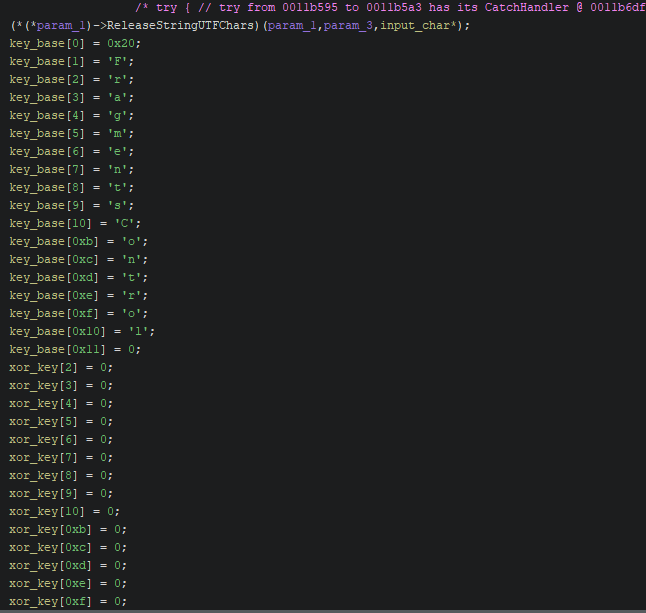
The algorithm we’re looking to crack
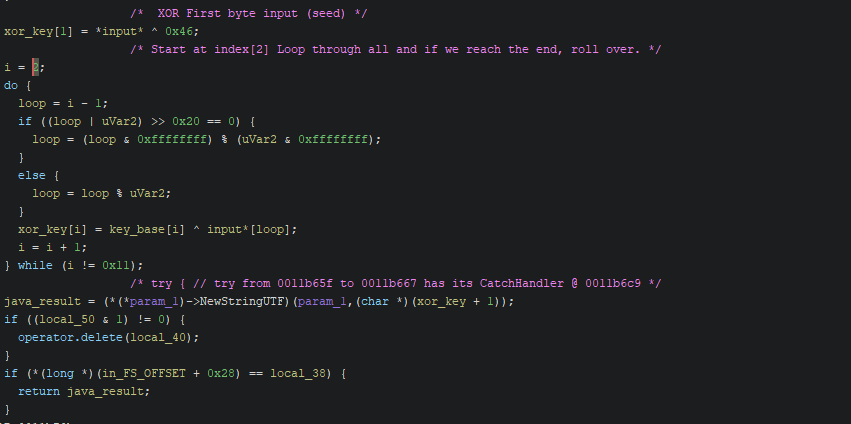 We are essentially doing the following
- Taking an initial string of chars as input from the function which in our case is
15539863 - Taking the first index of input and XOR by 69 effectively our seed for the resulting key.
- Looping through and XORing the rest of our input with the mask " FragmentsControl" but through the 2 - 17th index (15 times)
- Returning the key back to java for our decryption routine (java_result).
The nice thing about Rolling XOR is even if we inputted 3483248 but our key_base was 500 bytes long we would be able to roll over and repeat until all of our data was encrypted.
The Solve
Next I created a python script to pull the key given our input that we grabbed from JADX
def keygen(input_str):
    """
    Replicates the Fragment Logic
    input_str: The string passed to the Fragment method.
    """
    # This corresponds to key_base[]
    str_fragments_control = " FragmentsControl"
    input_len = len(input_str)

    # Initial seed byte: input[0] ^ 0x46
    key = [ord(input_str[0]) ^ 0x46]

    # Rolling XOR loop for the remaining 15 bytes
    # Replicates: xor_key[i] = key_base[i] ^ input*[loop]
    for i in range(2, 17):
        # Modular indexing for our rolling key
        input_char = ord(input_str[(i - 1) % input_len])
        mask_char = ord(str_fragments_control[i])
        value = input_char ^ mask_char
        key.append(value)

    return bytes(key).hex().upper()

# The string we found in JADX
print(keygen("15539863"))
This returned 77475454545D584742765A5D4D4A595F
Looks great!
I took longer than I would like to admit on this step I first wanted to implement an AES decryption routine given our key but I was having some issues and at this point I had been working on the challenge for a few hours with starting off looking through the boilerplate so I took a break.
During my break I remembered what the heart and soul of CTFs are Cyberchef!
I hopped onto cyberchef took our google.png found something that we could use as an offset “Drop Bytes” set the length to 71612 passed in our AES decrypt routine on ECB mode with our input as RAW from the drop bytes section
Boom we see the magic bytes dex!!!
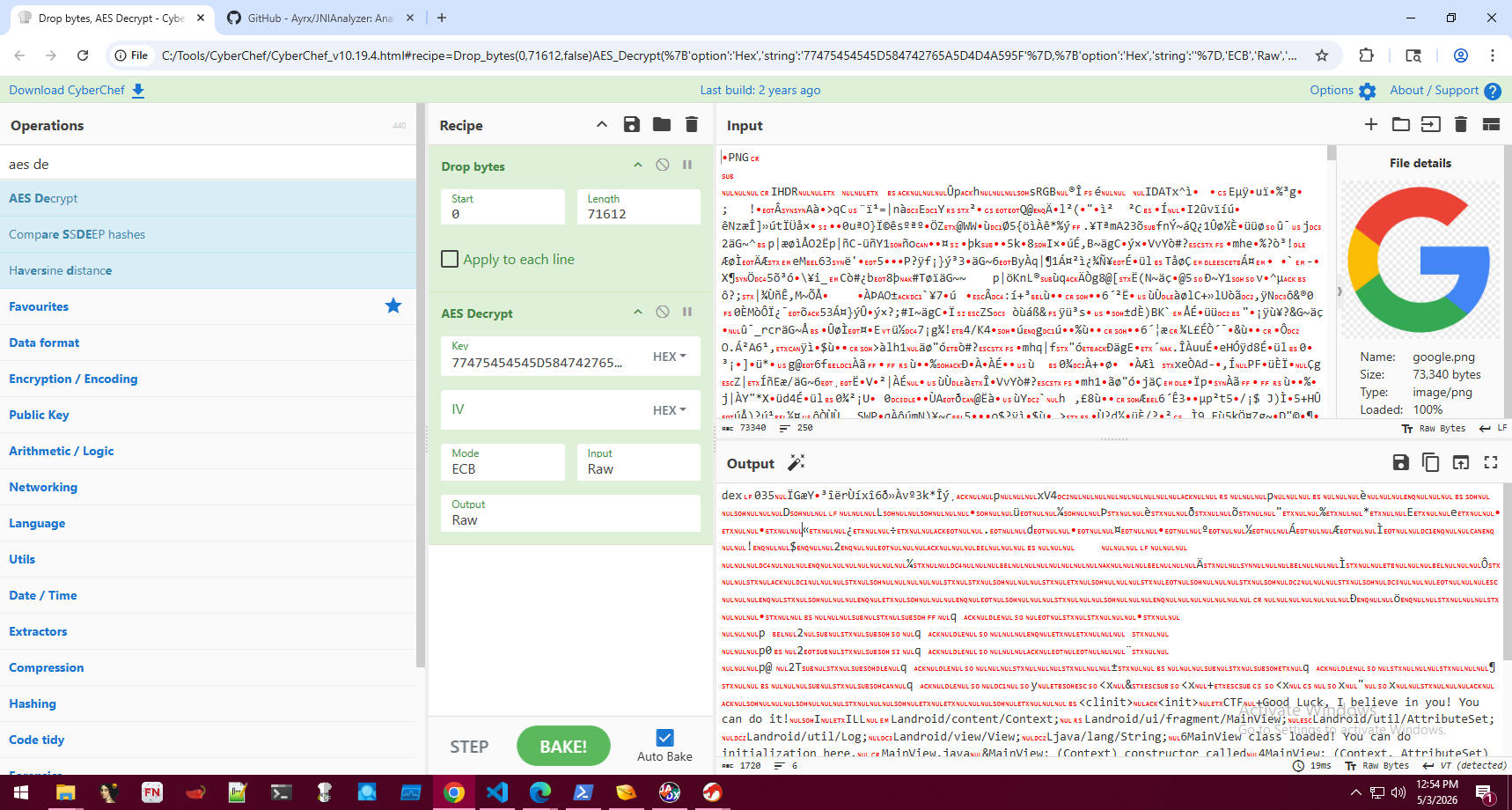
Now all we had to do was download it and open it up in JADX to see what’s going on.
Upon opening in JADX we see this
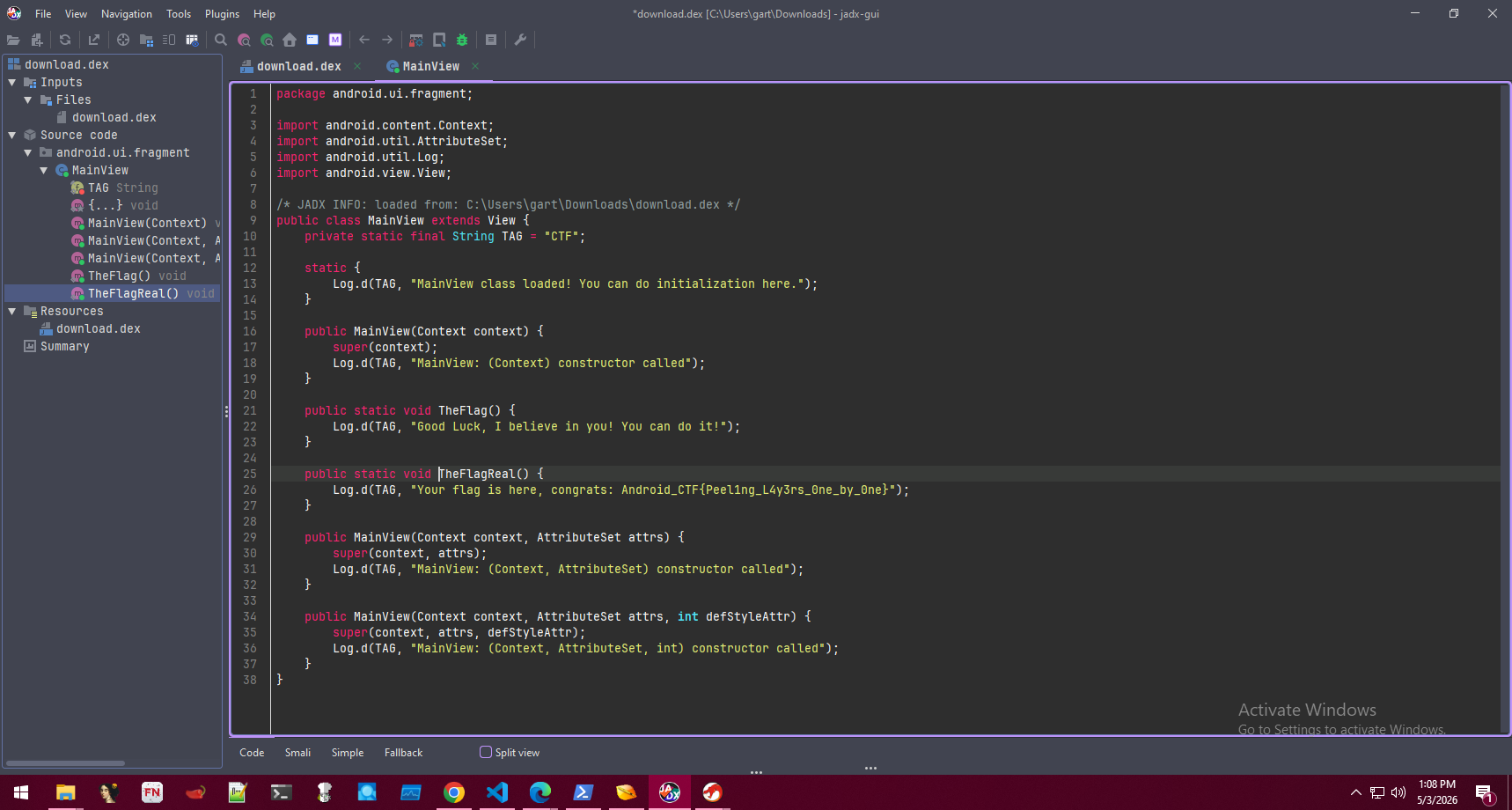
Our flag is Android_CTF{Peel1ng_L4y3rs_0ne_by_0ne}
Final Thoughts
I want to state that again I don’t really have alot of experience with APK reversing specifically, while I feel like I’m a very good PE reverser I don’t have alot of experience with APKs.
I feel that I was able to utilize my knowledge in scripting, general CTF techniques (stego, rolling XOR) that gave me a leg up once I got my footing.
Overall this challenge really gave me a good insight into android reversing and I had alot of fun :)
Total time spent was around 2 - 3 hours with a majority of the time being used as research due to my unfamiliarity with the android specific architecture.